
1.5 KiB
1.5 KiB
<status-indicator> web component
Circles with colors. That's it. That's the component.
Quick Start using a CDN
Copy the following to your HTML page:
<script type="module" src="https://esm.sh/@ayo-run/status-indicator"></script>

<status-indicator status="positive" pulse>
  All systems operational
</status-indicator>
Installation via NPM
If you want to install the library as a node module, you can install the published package via NPM:
# using npm
npm install @ayo-run/status-indicator

# or using pnpm
pnpm add @ayo-run/status-indicator
Usage
1. status property
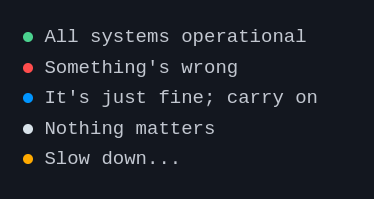
To indicate the status that determines the color of the circle, set the status property of the status-indicator component to any of the following: positive, negative, active, or intermediary.
<status-indicator status="positive"> All systems operational </status-indicator>
<status-indicator status="negative"> Something's wrong </status-indicator>
<status-indicator status="active"> It's just fine; carry on </status-indicator>
<status-indicator status="intermediary"> Slow down... </status-indicator>
<status-indicator> Nothing matters </status-indicator>
2. pulse animation
You can add the pulse attribute to make the circle... pulse
<status-indicator status="positive" pulse>
  All systems operational
</status-indicator>
Result
A project by Ayo