
90 lines
2.5 KiB
Markdown
90 lines
2.5 KiB
Markdown
# <status-indicator>
|
|
|
|
Colored circles that can pulse. That's it. That's the component.
|
|
|
|
## Quick Start using a CDN
|
|
|
|
Copy the following to your HTML page:
|
|
|
|
```html
|
|
<script type="module" src="https://esm.sh/@ayo-run/status-indicator@2.1.2/es2022/status-indicator.mjs"></script>
|
|
|
|
<status-indicator pulse status="positive">
|
|
All systems operational
|
|
</status-indicator>
|
|
```
|
|
|
|
See example on CodePen: https://codepen.io/ayo-run/pen/RNorXrK
|
|
|
|
## Installation via NPM
|
|
|
|
If you want to install the library as a node module, you can install the [published package](https://npmx.dev/@ayo-run/status-indicator) and the [base class](https://webcomponent.io) via NPM:
|
|
|
|
```bash
|
|
# using npm
|
|
npm install web-component-base @ayo-run/status-indicator
|
|
|
|
# or using pnpm
|
|
pnpm add web-component-base @ayo-run/status-indicator
|
|
```
|
|
|
|
## Usage: Imports
|
|
|
|
Without a bundler that resolves `node_module` imports for you, you can use [import
|
|
maps](https://developer.mozilla.org/en-US/docs/Web/HTML/Reference/Elements/script/type/importmap):
|
|
|
|
```html
|
|
<html>
|
|
<head>
|
|
<script type="importmap">
|
|
{
|
|
"imports": {
|
|
"web-component-base": "./node_modules/web-component-base/dist/index.js",
|
|
"status-indicator": "./node_modules/@ayo-run/status-indicator/dist/status-indicator.js"
|
|
}
|
|
}
|
|
</script>
|
|
<script type="module">
|
|
import StatusIndicator from "status-indicator";
|
|
</script>
|
|
</head>
|
|
<body>
|
|
<!-- you can use the status-indicator component now -->
|
|
</body>
|
|
</html>
|
|
```
|
|
|
|
> [!NOTE]
|
|
> Using import maps can also work with the CDN: https://codepen.io/ayo-run/pen/emBdQRg
|
|
|
|
## Usage: Attributes
|
|
|
|
### 1. `status` attribute
|
|
|
|
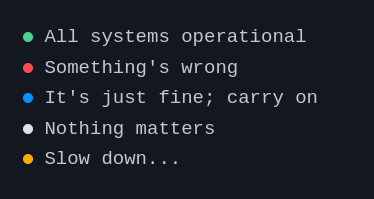
To indicate the status that determines the color of the circle, set the `status` attribute of the `status-indicator` component to any of the following values: `positive`, `negative`, `active`, or `intermediary`.
|
|
|
|
```html
|
|
<status-indicator status="positive"> All systems operational </status-indicator>
|
|
<status-indicator status="negative"> Something's wrong </status-indicator>
|
|
<status-indicator status="active"> It's just fine; carry on </status-indicator>
|
|
<status-indicator status="intermediary"> Slow down... </status-indicator>
|
|
<status-indicator> Nothing matters </status-indicator>
|
|
```
|
|
|
|
### 2. `pulse` animation
|
|
|
|
You can add the `pulse` attribute to make the circle... pulse
|
|
|
|
```html
|
|
<status-indicator pulse status="positive">
|
|
All systems operational
|
|
</status-indicator>
|
|
```
|
|
|
|
## Result
|
|
|
|
|
|
|
|
---
|
|
|
|
A project by _Ayo_
|