
153 lines
7.8 KiB
Markdown
153 lines
7.8 KiB
Markdown
# Play Minesweeper Online for Free
|
|
[](https://app.netlify.com/sites/mnswpr/deploys)
|
|
|
|
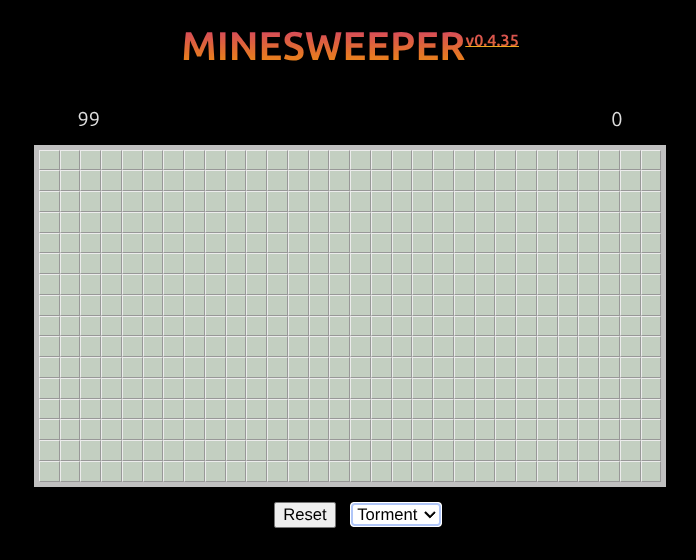
Play it here: [mnswpr.com](https://mnswpr.com). This is the classic game **Minesweeper** built with vanilla web technologies (i.e., no framework dependency).
|
|
|
|
|
|
|
|
## How to Play
|
|
|
|
The goal is to reveal every safe cell without detonating a mine. Your **first click is always safe**.
|
|
|
|
- **Left click** — reveal a cell
|
|
- **Right click** — flag / unflag a suspected mine
|
|
- **Left + right click together** (chording) — reveal the neighbors of a satisfied number
|
|
- **Touch** — tap to reveal, long-press to flag
|
|
|
|
|
|
## Ways to Use
|
|
|
|
The web is a wonderful, free, and open platform to create and distribute value. You can use **mnswpr** in different ways:
|
|
|
|
- as a deployed [web app](https://mnswpr.com)
|
|
- as a [library](https://npmx.dev/package/@cozy-games/mnswpr) with `npm i @cozy-games/mnswpr`
|
|
- as a `web component` (coming soon).
|
|
|
|
Using it as a library takes only a few lines — mount it onto any element by `id`:
|
|
|
|
```js
|
|
import '@cozy-games/mnswpr/mnswpr.css'
|
|
import mnswpr from '@cozy-games/mnswpr'
|
|
|
|
const game = new mnswpr('app')
|
|
game.initialize()
|
|
```
|
|
|
|
## Tooling
|
|
The project has gone through years of existence. It started from 2019 when tooling was massively different. I have [modernized it](https://elk.zone/social.ayco.io/@ayo/116333804543330938) since and have witnessed how much easier and faster it is to build now - even without web frameworks or LLMs!
|
|
|
|
As of now the tooling I use are:
|
|
- [Vite](https://vite.dev/) for bundling and development server
|
|
- [Eslint](https://eslint.org) for JS linting & [CSS linting](https://eslint.org/blog/2025/02/eslint-css-support/)
|
|
- [ESLint Stylistic](https://eslint.style) for JS formatting
|
|
- [Husky](https://typicode.github.io/husky/) for git hooks
|
|
- [PNPM](https://pnpm.io/installation) for dependency & workspace management
|
|
- and a bunch of automation using scripts and Continuous Integration actions
|
|
|
|
Because a big part of this project's purpose is to track how the software development industry evolves — and because it has come a long way in modernizing along the way — I now also use it as a **playground for coding agents**. It's a small, framework-free, well-scoped codebase, which makes it a great sandbox to see how AI agents read, reason about, and change real code. To help them get their bearings quickly, the repo ships an [`AGENTS.md`](./AGENTS.md) describing the architecture and conventions.
|
|
|
|
## Development
|
|
|
|
Technology Stack: HTML, JS, and CSS; [Google Firebase](https://firebase.google.com) for leader board store; [Netlify](https://netlify.com) for hosting
|
|
|
|
To start development, you need [`node`](https://nodejs.org/en/download). I highly recommend [`pnpm`](https://pnpm.io/installation) to be used as well. Once you know you have this, you can do the following:
|
|
1. Install dependencies: `pnpm i`
|
|
2. Start the dev server: `pnpm -F mnswpr run dev`
|
|
|
|
The rest of the everyday commands:
|
|
|
|
```bash
|
|
pnpm test # run the Vitest suite (workspace-wide)
|
|
pnpm lint # ESLint (JS + CSS)
|
|
pnpm lint:fix # ESLint with autofix
|
|
pnpm -F mnswpr run build # build the website
|
|
pnpm build:lib # build the publishable library
|
|
```
|
|
|
|
### Leaderboard (local Firestore emulator)
|
|
|
|
The leader board is backed by [Google Firestore](https://firebase.google.com). For local development the app talks to the **Firestore emulator** by default — fully local, no cloud, no deploy. The flag `VITE_FIRESTORE_EMULATOR=1` is already set in `app/.env.development`.
|
|
|
|
`dev` is the whole loop in one command — it wraps Vite in `firebase emulators:exec`, so the Firestore emulator (on :8080, + UI) comes up, gets **seeded with sample scores automatically**, and the app dev server starts against it; everything shuts down when you stop it. (Each `dev` starts a fresh in-memory emulator, so the auto-seed writes exactly one clean set every time — no accumulation.) `firebase-tools` is a pinned **devDependency** of this app (installed by `pnpm install`, invoked as the `firebase` binary), so the only extra prerequisite is **Java** — the Firestore emulator is a Java program (`java -jar cloud-firestore-emulator-*.jar`), and firebase-tools does not bundle a JRE.
|
|
|
|
**Usually automatic.** `pnpm install` runs a root `postinstall` ([`scripts/ensure-java.mjs`](../../scripts/ensure-java.mjs)) that installs a user-local Temurin JRE 21 into `~/.local` (no `sudo`) when `java` isn't already on your PATH. It's idempotent and never fails the install, and it skips when `CI` or `SKIP_JRE_SETUP=1` is set, or on unsupported platforms.
|
|
|
|
If that skipped and you need Java (or prefer a system-wide install), do it manually — **install a JRE (Java 11+; 21 recommended):**
|
|
|
|
```bash
|
|
# Debian / Ubuntu / Pop!_OS
|
|
sudo apt update && sudo apt install -y openjdk-21-jre-headless
|
|
|
|
# Fedora
|
|
sudo dnf install -y java-21-openjdk-headless
|
|
|
|
# macOS (Homebrew)
|
|
brew install openjdk@21
|
|
|
|
java -version # verify: should print "openjdk 21.x" (or 11+)
|
|
```
|
|
|
|
No `sudo`? Install a JRE into your home directory instead (no root needed):
|
|
|
|
```bash
|
|
curl -fsSL -o /tmp/jre21.tgz "https://api.adoptium.net/v3/binary/latest/21/ga/linux/x64/jre/hotspot/normal/eclipse"
|
|
mkdir -p ~/.local/lib && tar xzf /tmp/jre21.tgz -C ~/.local/lib
|
|
ln -sf ~/.local/lib/jdk-21*-jre/bin/java ~/.local/bin/java # ~/.local/bin is already on PATH
|
|
java -version
|
|
```
|
|
|
|
Without Java, `dev` and `db:start` fail with `Could not spawn 'java -version'`. Install it to a permanent location — a JRE unpacked under `/tmp` disappears when the OS cleans temp files. Then just:
|
|
|
|
```bash
|
|
pnpm -F mnswpr run dev # emulator (:8080 + UI) + auto-seed + app dev server — one command
|
|
```
|
|
|
|
That's the everyday loop. The other DB scripts are for when you want to run pieces separately:
|
|
|
|
```bash
|
|
pnpm -F mnswpr run db:start # emulator only (stays up across app restarts); pair with dev:no-db
|
|
pnpm -F mnswpr run db:seed # seed a separately-running emulator (what dev does for you)
|
|
pnpm -F mnswpr run db:stop # kill a stray/orphaned emulator holding :8080
|
|
```
|
|
|
|
To skip the emulator entirely — for quick UI-only work, or if you don't have a JDK — run `pnpm -F mnswpr run dev:no-db` (plain Vite) and set `VITE_FIRESTORE_EMULATOR=` (empty) in a local, gitignored `app/.env.local`; the app then uses the cloud `mw-test` namespace instead.
|
|
|
|
See [`docs/firebase-leaderboards.md`](./docs/firebase-leaderboards.md) for the full data model, security rules, environments, and deployment.
|
|
|
|
## Contributing
|
|
|
|
Contributions are welcome! See [`AGENTS.md`](./AGENTS.md) for the architecture, conventions, and release workflow before opening a pull request.
|
|
|
|
## You just want to play?
|
|
|
|
*👉 The live site is here: [mnswpr.com](https://mnswpr.com)*
|
|
|
|
## Background
|
|
One day, while working in my home office, I heard loud and fast mouse clicks coming from our bedroom. It's my wife, playing her favorite game (Minesweeper) on a crappy website full of advertisements.
|
|
|
|
I can't allow this, it's a security issue. 🤣
|
|
|
|
But it is also an opportunity.
|
|
|
|
I wanted to give her the same game, with a similar leader board she can dominate. And this is also a chance for me to dig deeper into vanilla JS.
|
|
|
|
Can I make a page with complex interactions (more on this later) without any library dependency?
|
|
|
|
## What I have learned:
|
|
1. JS is awesome ✨
|
|
1. We don't always *need* JS frameworks (or TS) ✨
|
|
1. Even subtle UI changes *can improve* user gameplay experience ✨
|
|
1. There's more ways to break your app than you are initially aware of ✨
|
|
1. Competition motivates users to use your app more ✨
|
|
1. Hash in bundled filenames helps avoid issues with browser caching (when shipping versions fast) ✨
|
|
|
|
|
|
|
|
## License
|
|
|
|
[BSD-2-Clause](./LICENSE)
|
|
|
|
---
|
|
|
|
_Just keep building._<br>
|
|
_A project by [Ayo](https://ayo.ayco.io)_
|