# Web Component Base
[](https://www.npmjs.com/package/web-component-base)
[](https://www.npmjs.com/package/web-component-base)
[](https://www.npmjs.com/package/web-component-base)
[](#library-size)
🤷♂️ zero-dependency, 🤏 tiny JS base class for creating reactive custom elements easily ✨
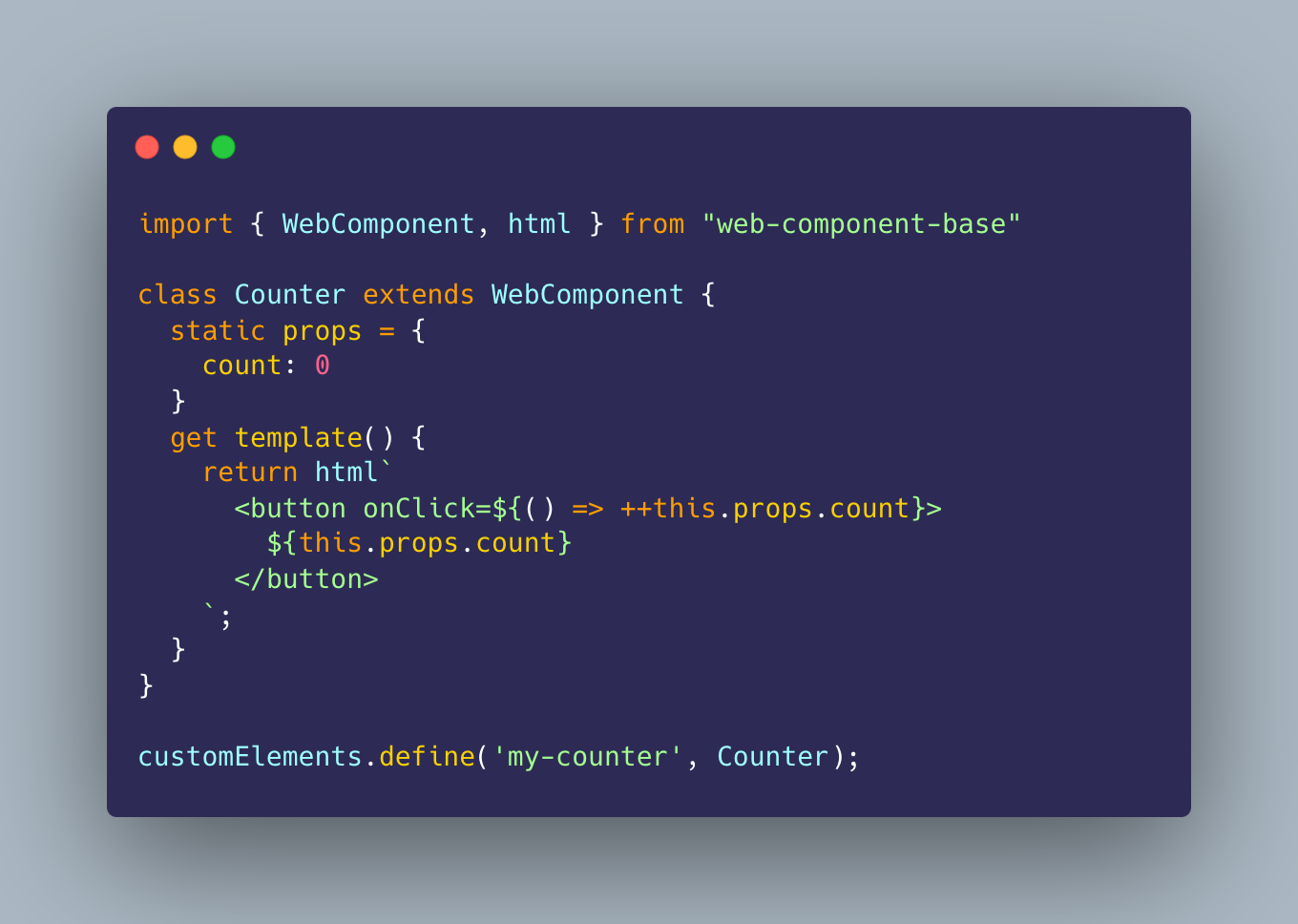
When you extend the `WebComponent` class for your component, you only have to define the `template` and `properties`. Any change in any property value will automatically cause just the component UI to render.
The result is a reactive UI on property changes. [View on CodePen ↗](https://codepen.io/ayoayco-the-styleful/pen/ZEwoNOz?editors=1010)
## Table of Contents
1. [Project Status](#project-status)
1. [Installation](#installation)
1. [Import via unpkg](#import-via-unpkg)
1. [Installation via npm](#installation-via-npm)
1. [Exports](#exports)
1. [Main Exports](#main-exports)
1. [Utilities](#utilities)
1. [Usage](#usage)
1. [`template` vs `render()`](#template-vs-render)
1. [Prop access](#prop-access)
1. [Alternatives](#alternatives)
1. [Just the Templating](#just-the-templating)
1. [Quick Start Example](#quick-start-example)
1. [Life-Cycle Hooks](#life-cycle-hooks)
1. [`onInit`](#oninit) - the component is connected to the DOM, before view is initialized
1. [`afterViewInit`](#afterviewinit) - after the view is first initialized
1. [`onDestroy`](#ondestroy) - the component is disconnected from the DOM
1. [`onChanges`](#onchanges) - every time an attribute value changes
1. [Library Size](#library-size)
## Project Status
It is ready for majority of cases people use custom elements for. If you have a cool project built on **WebComponent.io** we'd love to know! Please [open an issue](https://github.com/ayoayco/web-component-base/issues/new) or reach out to [Ayo](https://ayco.io/@ayo) if you want to be featured on the project website :)
For building some advanced interactions, we have a few issues that are still open: [#24 smart diffing](https://github.com/ayoayco/web-component-base/issues/24), [#15 memoization](https://github.com/ayoayco/web-component-base/issues/15), [#4 attachEffect improvements](https://github.com/ayoayco/web-component-base/issues/4)
In the mean time, if you have some complex needs, we recommend using the `WebComponent` base class with a more mature rendering approach like `lit-html`... and here's a demo for that: [View on CodePen ↗](https://codepen.io/ayoayco-the-styleful/pen/ZEwNJBR?editors=1010).
...or you can even [use just parts](#just-the-templating) of it for your own base class.
## Installation
The library is distributed as complete ECMAScript Modules (ESM) and published on [NPM](https://ayco.io/n/web-component-base). Please file an issue in our [issue tracker](https://ayco.io/gh/web-component-base/issues) for problems or requests regarding our distribution.
### Use on the browser via unpkg (no bundlers needed!)
Import using [unpkg](https://unpkg.com/web-component-base) in your vanilla JS component. You can replace the version `@latest` in the URL with specific versions. We will use this in the rest of our [usage examples](#usage).
```js
import { WebComponent } from "https://unpkg.com/web-component-base@latest/index.js"
```
### Installation via npm
Usable for projects with bundlers or using import maps pointing to the specific files downloaded in `node_modules/web-component-base`.
```bash
npm i web-component-base
```
## Exports
You can import everything separately, or in a single file each for the main exports and utilities.
### Main Exports
```js
// all in a single file
import { WebComponent, html, attachEffect } from "web-component-base";
// in separate files
import { WebComponent } from "web-component-base/WebComponent.js";
import { html } from "web-component-base/html.js";
import { attachEffect } from "web-component-base/attach-effect.js";
```
### Utilities
```js
// in a single file
import { serialize, deserialize, getCamelCase, getKebabCase, createElement } from "web-component-base/utils";
// or separate files
import { serialize } from "web-component-base/utils/serialize.js";
import { createElement } from "web-component-base/utils/create-element.js";
// etc...
```
## Usage
In your component class:
```js
// HelloWorld.mjs
import { WebComponent } from "https://unpkg.com/web-component-base@latest/index.js";
class HelloWorld extends WebComponent {
static props ={
myName: 'World',
emotion: 'sad'
}
get template() {
return `
`;
}
}
customElements.define('hello-world', HelloWorld);
```
In your HTML page:
```html
```
The result is a reactive UI that updates on attribute changes:
## `template` vs `render()`
This mental model attempts to reduce the cognitive complexity of authoring components:
1. The `template` is a read-only property (initialized with a `get` keyword) that represents *how* the component view is rendered.
1. There is a `render()` method that triggers a view render.
1. This `render()` method is *automatically* called under the hood every time an attribute value changed.
1. You can *optionally* call this `render()` method at any point to trigger a render if you need (eg, if you have private unobserved properties that need to manually trigger a render)
1. Overriding the `render()` function for handling a custom `template` is also possible. Here's an example of using `lit-html`: [View on CodePen ↗](https://codepen.io/ayoayco-the-styleful/pen/ZEwNJBR?editors=1010)
## Prop Access
The `props` property of the `WebComponent` interface is provided for easy read/write access to a camelCase counterpart of *any* observed attribute.
```js
class HelloWorld extends WebComponent {
static props = {
myProp: 'World'
}
get template() {
return html`
Hello ${this.props.myProp}
`;
}
}
```
Assigning a value to the `props.camelCase` counterpart of an observed attribute will trigger an "attribute change" hook.
For example, assigning a value like so:
```
this.props.myName = 'hello'
```
...is like calling the following:
```
this.setAttribute('my-name','hello');
```
Therefore, this will tell the browser that the UI needs a render if the attribute is one of the component's observed attributes we explicitly provided with `static props`;
> [!NOTE]
> The `props` property of `WebComponent` works like `HTMLElement.dataset`, except `dataset` is only for attributes prefixed with `data-`. A camelCase counterpart using `props` will give read/write access to any attribute, with or without the `data-` prefix.
> Another advantage over `HTMLElement.dataset` is that `WebComponent.props` can hold primitive types 'number', 'boolean', 'object' and 'string'.
### Alternatives
The current alternatives are using what `HTMLElement` provides out-of-the-box, which are:
1. `HTMLElement.dataset` for attributes prefixed with `data-*`. Read more about this [on MDN](https://developer.mozilla.org/en-US/docs/Web/API/HTMLElement/dataset).
1. Methods for reading/writing attribute values: `setAttribute(...)` and `getAttribute(...)`; note that managing the attribute names as strings can be difficult as the code grows.
## Just the Templating
You don't have to extend the whole base class just to use some features. All internals are exposed and usable separately so you can practically build the behavior on your own classes.
Here's an example of using the `html` tag template on a class that extends from vanilla `HTMLElement`... also [View on CodePen ↗](https://codepen.io/ayoayco-the-styleful/pen/bGzJQJg?editors=1010).
```js
import {html} from 'https://unpkg.com/web-component-base/html'
import {createElement} from 'https://unpkg.com/web-component-base/utils'
class MyQuote extends HTMLElement {
connectedCallback() {
const el = createElement(html`
`);
this.appendChild(el)
}
}
customElements.define('my-quote', MyQuote)
```
## Quick Start Example
Here is an example of using a custom element in a single .html file. [View on CodePen ↗](https://codepen.io/ayoayco-the-styleful/pen/ZEwoNOz?editors=1010)
```html
WC Base Test
```
## Life-Cycle Hooks
Define behavior when certain events in the component's life cycle is triggered by providing hook methods
### onInit()
- Triggered when the component is connected to the DOM
- Best for setting up the component
```js
import { WebComponent } from "https://unpkg.com/web-component-base@latest/index.js";
class ClickableText extends WebComponent {
// gets called when the component is used in an HTML document
onInit() {
this.onclick = () => console.log(">>> click!");
}
get template() {
return `Click me!`;
}
}
```
### afterViewInit()
- Triggered after the view is first initialized
```js
class ClickableText extends WebComponent {
// gets called when the component's innerHTML is first filled
afterViewInit() {
const footer = this.querySelector('footer');
// do stuff to footer after view is initialized
}
get template() {
return ``;
}
}
```
### onDestroy()
- Triggered when the component is disconnected from the DOM
- best for undoing any setup done in `onInit()`
```js
import { WebComponent } from "https://unpkg.com/web-component-base@latest/index.js";
class ClickableText extends WebComponent {
clickCallback() {
console.log(">>> click!");
}
onInit() {
this.onclick = this.clickCallback;
}
onDestroy() {
console.log(">>> removing event listener");
this.removeEventListener("click", this.clickCallback);
}
get template() {
return `Click me!`;
}
}
```
### onChanges()
- Triggered when an attribute value changed
```js
import { WebComponent } from "https://unpkg.com/web-component-base@latest/index.js";
class ClickableText extends WebComponent {
// gets called when an attribute value changes
onChanges(changes) {
const {property, previousValue, currentValue} = changes;
console.log('>>> ', {property, previousValue, currentValue})
}
get template() {
return `Click me!`;
}
}
```
## Library Size
All the functions and the base class in the library are minimalist by design and only contains what is needed for their purpose.
As of v2.0.0, the main export (with `WebComponent` + `html` + `attachEffect`) is 1.7 kB (min + gzip) according to [bundlephobia.com](https://bundlephobia.com/package/web-component-base@2.0.0), and the `WebComponent` base class is just 1.1 kB (min + brotli) according to [size-limit](http://github.com/ai/size-limit).
There is an increase in size compared to that of before this release, primarily because of advanced features (e.g., effects, html tagged templates, and props blueprints) in building complex applications.
> [!NOTE]
> As a builder of both simple sites and complex web apps, I recognize that not all custom elements need advanced features for reactivity.
>
>I also don't want to get things in my code that I don't need (YAGNI -- You Aren't Gonna Need It)... and I want a base class for simpler use cases that don't have Proxy props or attaching effects...
>
>To address this, I am working on a "lite" version of my base class here... please stay tuned.
>
> - Ayo Ayco
 ## `template` vs `render()`
This mental model attempts to reduce the cognitive complexity of authoring components:
1. The `template` is a read-only property (initialized with a `get` keyword) that represents *how* the component view is rendered.
1. There is a `render()` method that triggers a view render.
1. This `render()` method is *automatically* called under the hood every time an attribute value changed.
1. You can *optionally* call this `render()` method at any point to trigger a render if you need (eg, if you have private unobserved properties that need to manually trigger a render)
1. Overriding the `render()` function for handling a custom `template` is also possible. Here's an example of using `lit-html`: [View on CodePen ↗](https://codepen.io/ayoayco-the-styleful/pen/ZEwNJBR?editors=1010)
## Prop Access
The `props` property of the `WebComponent` interface is provided for easy read/write access to a camelCase counterpart of *any* observed attribute.
```js
class HelloWorld extends WebComponent {
static props = {
myProp: 'World'
}
get template() {
return html`
## `template` vs `render()`
This mental model attempts to reduce the cognitive complexity of authoring components:
1. The `template` is a read-only property (initialized with a `get` keyword) that represents *how* the component view is rendered.
1. There is a `render()` method that triggers a view render.
1. This `render()` method is *automatically* called under the hood every time an attribute value changed.
1. You can *optionally* call this `render()` method at any point to trigger a render if you need (eg, if you have private unobserved properties that need to manually trigger a render)
1. Overriding the `render()` function for handling a custom `template` is also possible. Here's an example of using `lit-html`: [View on CodePen ↗](https://codepen.io/ayoayco-the-styleful/pen/ZEwNJBR?editors=1010)
## Prop Access
The `props` property of the `WebComponent` interface is provided for easy read/write access to a camelCase counterpart of *any* observed attribute.
```js
class HelloWorld extends WebComponent {
static props = {
myProp: 'World'
}
get template() {
return html`